
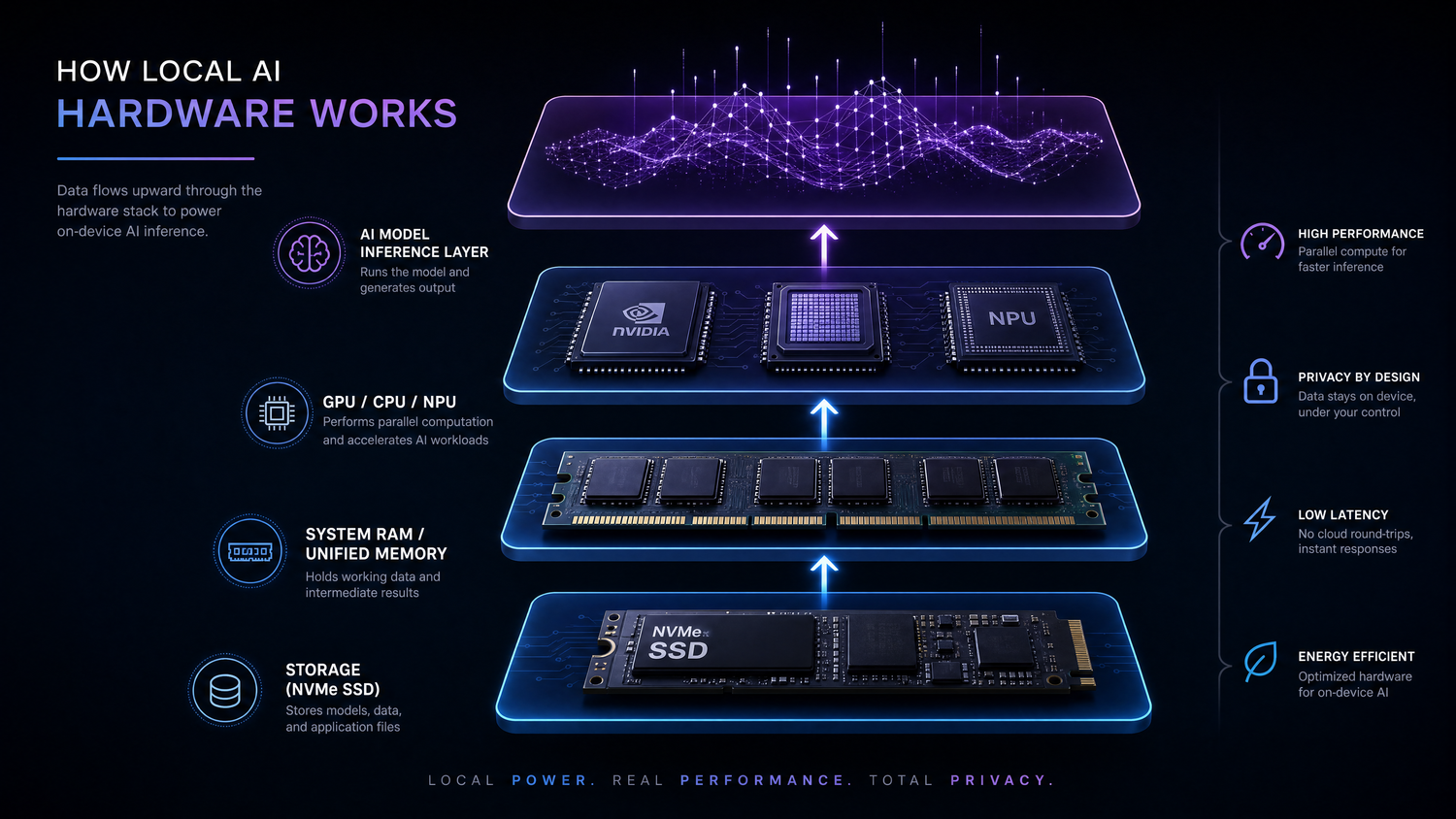
Why Choosing Local AI Hardware Is More Complicated Than Ever
Just a few years ago, running AI models locally was mostly limited to researchers, developers, and enthusiasts with expensive desktop workstations. Today, things look very different. Open-source large language models (LLMs), image generation tools, AI coding assistants, and speech recognition software have made local AI accessible to a much wider audience.
As a result, more people are asking the same question:
What kind of hardware do I actually need to run AI locally?
Unfortunately, there isn't a single answer.
Someone who wants to chat with a lightweight language model has very different hardware requirements from someone generating high-resolution images or experimenting with a 70-billion-parameter LLM. Two computers with similar processor specifications can also deliver completely different AI performance depending on their memory architecture and graphics capabilities.
This is where many buying guides become confusing. Marketing materials often emphasize processor names, AI TOPS, or graphics performance, while overlooking the factors that frequently determine whether a model runs smoothly at all.
The goal of this guide is not to recommend the most powerful or most expensive computer. Instead, it explains which hardware components matter for different local AI workloads, how they work together, and how to choose hardware that fits your workflow rather than chasing specifications you may never use.
By the end of this article, you'll understand why memory is often more important than raw CPU speed, where GPUs and NPUs actually fit into the picture, and which type of system makes the most sense for your AI projects.
Different AI Tasks Need Different Hardware
One of the biggest misconceptions about local AI is treating it as a single workload.
In reality, "running AI" can mean anything from asking a chatbot to summarize meeting notes to generating photorealistic images or building autonomous AI agents. These workloads place very different demands on your hardware.
For example, a small language model designed for offline conversations may run comfortably on a modern PC with integrated graphics and sufficient memory. On the other hand, generating images with Stable Diffusion or experimenting with larger LLMs often requires significantly more graphics performance and memory capacity.
The table below provides a simplified overview.
|
AI Task |
Typical Hardware Demand |
|
AI Chat & Writing Assistants |
Low |
|
AI Coding Assistants |
Medium |
|
Image Generation |
High |
|
Video Generation |
Very High |
|
Large Local LLMs |
Extremely High |
This is why online hardware recommendations often seem contradictory.
One article may claim that 32GB of RAM is enough, while another recommends 128GB or more. In many cases, both recommendations are correct—they simply assume different workloads.
Before comparing processors or graphics cards, it's worth identifying what you actually want to do with AI. Choosing hardware based on your intended workload usually leads to a much better long-term investment than buying components solely because they have the highest benchmark scores.
What Actually Determines Local AI Performance?
Many buyers naturally focus on processor names or GPU model numbers. While these specifications matter, they rarely tell the whole story.
Local AI performance is typically determined by four factors working together:
- Memory capacity
- Memory bandwidth
- GPU compute performance
- Storage speed
Each influences a different part of the AI workflow.
Memory Capacity
Memory capacity determines whether a model can fit into available memory at all.
Every AI model occupies memory while it is loaded. Larger models require more space, and increasing the context length or using higher-precision formats can further increase memory usage.
If a model cannot fit into available memory, performance usually drops dramatically as data is moved between fast memory and slower storage—or the model may simply fail to load.
For many local AI workloads, memory capacity becomes the first limitation long before processor performance does.
Memory Bandwidth
Having enough memory is only part of the equation.
Memory bandwidth determines how quickly data moves between memory and the processor or graphics hardware.
During inference, modern language models continuously read model weights from memory. Even when the model fits comfortably, limited bandwidth can significantly reduce token generation speed.
This explains why two systems with the same amount of memory may produce very different real-world AI performance.
Simply put:
- Capacity determines whether a model fits.
- Bandwidth determines how efficiently it runs.
Both matter, but capacity is often the first hurdle most users encounter.
GPU Compute Performance
Once memory requirements are satisfied, graphics processing power becomes increasingly important.
Workloads such as image generation, video generation, and larger language models rely heavily on parallel computation, making modern GPUs far more efficient than CPUs for these tasks.
However, GPU performance should not be viewed in isolation.
A powerful GPU paired with insufficient memory may still struggle to run larger models. Likewise, upgrading to a faster graphics card will not solve memory limitations if the workload cannot fit into available memory in the first place.
For many users, balanced hardware delivers a better experience than maximizing a single component.
Storage Speed
Storage is rarely the primary performance bottleneck during inference, but it still affects the overall experience.
Fast NVMe SSDs reduce the time required to load large models, switch between projects, or initialize AI applications. When working with multiple models or large datasets, slower storage can noticeably increase waiting time even if inference speed remains unchanged.
While storage speed won't make tokens generate faster, it contributes to a smoother workflow—especially for developers and creators who frequently load different models throughout the day.
Together, these four factors explain why AI hardware recommendations can vary so widely.
The next question is equally important:
Where should all of that memory actually live?
Should it be dedicated GPU VRAM, shared unified memory, or traditional system RAM?
Understanding the differences between these memory architectures is often the key to choosing the right hardware for local AI.
GPU VRAM, Unified Memory, and System RAM: What's the Difference?
When comparing AI PCs, gaming desktops, and modern Mini PCs, you'll quickly encounter three different types of memory: GPU VRAM, unified memory, and system RAM.
Although all three store data, they serve different purposes—and understanding how they interact can help explain why seemingly similar systems behave very differently when running local AI.
Why VRAM Becomes the First Limitation
On traditional desktop systems with a discrete graphics card, AI models are typically loaded into the GPU's dedicated VRAM.
Because GPUs perform most AI inference, VRAM often becomes the first resource to run out.
For example, a graphics card may have plenty of computing power but only 8GB of VRAM. In that case, larger language models or higher-resolution image generation workloads may exceed available memory even though the GPU itself remains underutilized.
This is one reason why VRAM capacity often matters more than raw graphics performance for many AI workloads.
How Unified Memory Changes the Equation
Unified memory follows a different design philosophy.
Instead of maintaining separate pools for CPU memory and GPU memory, unified-memory systems allow multiple processors to access the same high-speed memory pool.
This doesn't eliminate hardware limitations, but it does reduce the rigid boundary between traditional system RAM and graphics memory. For memory-intensive AI workloads, this architecture can make larger models accessible without requiring extremely large amounts of dedicated VRAM.
Unified memory has become an increasingly important topic as more AI-focused computing platforms adopt this approach.
Why System RAM Still Matters
Even on systems equipped with dedicated GPUs, system RAM remains essential.
The operating system, AI frameworks, model loading process, preprocessing tasks, and CPU-side computations all depend on system memory.
Insufficient RAM can create bottlenecks even if GPU resources remain available. A balanced configuration is therefore generally preferable to investing heavily in one component while neglecting the others.
What Happens When Memory Runs Out?
When available memory is exhausted, performance usually degrades before the application stops working.
Depending on the software and hardware platform, the system may begin swapping data to storage, reduce processing speed significantly, or refuse to load the model altogether.
This is why experienced users often prioritize having enough memory for their target models before chasing higher processor or GPU specifications.
Choosing hardware that comfortably fits your expected workload usually delivers a smoother experience than purchasing faster compute hardware with insufficient memory.
CPU, GPU, and NPU: Which One Really Matters?
After understanding the importance of memory, the next question is often:
Which processor matters most for local AI—the CPU, GPU, or NPU?
The answer depends on what you're trying to accomplish.
Despite marketing materials that often focus on AI TOPS or processor branding, these three components serve very different purposes. Understanding their roles makes it much easier to choose hardware that matches your workflow.
CPU: The Coordinator Behind Every AI Workflow
The CPU rarely performs the bulk of AI inference, but it remains essential throughout the entire workflow.
It handles tasks such as:
- Launching AI applications
- Preparing and loading models
- Managing memory allocation
- Running the operating system and background processes
- Coordinating communication between hardware components
For lightweight AI tasks, the CPU may even perform inference on its own. However, once models become larger or workloads become more demanding, dedicated AI accelerators typically take over the heavy computation.
The good news is that most modern mid-range desktop processors are already powerful enough for local AI. Unless you're compiling models, training networks, or running multiple workloads simultaneously, upgrading from a recent mainstream processor usually provides only modest improvements.
GPU: The Workhorse of Local AI
If memory determines whether a model can run, the GPU often determines how well it runs.
Graphics processors are designed to execute thousands of operations simultaneously, making them particularly effective for workloads such as:
- Large language model inference
- Stable Diffusion and image generation
- Video generation
- AI upscaling
- AI-assisted creative applications
In these scenarios, GPU performance has a direct impact on responsiveness and generation speed.
However, raw GPU power is only one part of the equation.
A high-end graphics card with limited VRAM may struggle to run larger models, while a more balanced system with greater available memory can often provide a smoother overall experience.
For many local AI users, choosing enough memory first and GPU performance second is a practical strategy.
NPU: Helpful, but Not the Main Performance Driver
NPUs (Neural Processing Units) have become one of the biggest talking points in modern AI PCs.
Unlike CPUs and GPUs, NPUs are specialized processors designed for highly efficient AI acceleration while consuming very little power.
They're particularly useful for:
- Background AI features in Windows
- Live captions and real-time translation
- Webcam enhancements
- Noise suppression
- On-device AI assistants
- Other lightweight AI experiences
These workloads benefit from the NPU's efficiency, especially on laptops where battery life matters.
However, for today's local LLMs, image generation tools, and other demanding AI applications, NPUs generally are not the primary bottleneck.
Most open-source AI software still relies far more heavily on available memory and GPU resources than on NPU acceleration.
As software ecosystems continue to evolve, NPUs will likely play a larger role—but for now, buyers should view them as an additional capability rather than the deciding factor.
Why AI TOPS Don't Tell the Whole Story
Processor manufacturers frequently advertise AI performance using TOPS (Tera Operations Per Second).
While this metric has value, it can also be misleading when viewed in isolation.
TOPS measures theoretical AI processing capability under specific conditions. It does not directly indicate:
- Which AI models can run
- How much memory is available
- Token generation speed
- Image generation performance
- Overall user experience
Two systems with similar TOPS ratings may perform very differently depending on their memory architecture, GPU capabilities, and software optimization.
When evaluating an AI PC, it's generally better to consider the entire hardware platform rather than focusing on a single marketing number.
Quick Hardware Recommendations by Use Case
Rather than asking "What's the best AI hardware?", a better question is:
"What's the best hardware for the AI tasks I actually want to run?"
The recommendations below provide a practical starting point for common local AI workflows.
|
Use Case |
Recommended Hardware |
|
AI Chat, Writing Assistance |
Modern multi-core CPU, 32GB RAM, integrated graphics are often sufficient for basic tasks where low-latency response is not a primary concern |
|
AI Coding Assistants |
Modern CPU, 32–64GB RAM, fast NVMe SSD |
|
Image Generation (Stable Diffusion, FLUX) |
Powerful GPU with sufficient VRAM or a large unified-memory platform |
|
Large Local LLMs |
High-memory platform (64GB–128GB+) with strong memory bandwidth |
|
AI Development & Experimentation |
Expandable platform with fast storage and room for future upgrades |
These are not strict requirements, but practical guidelines.
Smaller models will generally run on less powerful hardware, while larger models, longer context windows, and more demanding workflows require increasingly capable systems.
Instead of buying hardware based on today's largest model, many users benefit more from choosing a system that comfortably handles their current workload while leaving room to grow.
Choosing the Right Platform
Once you've identified your workload, the next decision is choosing the type of computer that best fits your needs.
Each platform offers different strengths, and no single solution is ideal for every user.
Compact AI PCs
Modern AI Mini PCs have evolved well beyond basic office computers.
Powered by current-generation processors with integrated AI capabilities, they combine strong CPU performance, increasingly capable integrated graphics, fast SSD storage, and generous memory capacities in a compact form factor.
They're particularly well suited for:
- Everyday local AI
- Coding assistants
- AI productivity
- Home offices
- Edge AI deployments
- Home labs
Many users also appreciate their low power consumption and quiet operation compared with traditional desktop systems.
Discrete GPU Towers
Desktop systems equipped with dedicated graphics cards remain the most flexible choice for demanding AI workloads.
They typically offer:
- Higher graphics performance
- Larger dedicated VRAM
- Easier hardware upgrades
- Support for multiple GPUs
- Greater expansion options
For professional image generation, AI research, or running extremely large language models, a desktop workstation often remains the preferred platform.
The trade-off is increased cost, power consumption, and physical size.
Unified-Memory Systems
A growing number of AI-focused computers now rely on unified memory architectures.
Rather than separating CPU memory and GPU memory, these systems allow processors to share the same memory pool.
For memory-intensive AI workloads, unified memory can make larger models accessible without requiring extremely large amounts of dedicated VRAM.
Although unified memory doesn't eliminate hardware limitations, it offers an increasingly attractive balance between performance, efficiency, and accessibility for many AI users.
Which Platform Is Right for You?
Choosing the right platform ultimately comes down to your priorities.
If you value maximum graphics performance and frequent hardware upgrades, a traditional desktop tower is difficult to beat.
If you need a balance of performance, power efficiency, and space-saving design, a modern AI Mini PC may be the better fit.
And if your workloads regularly push memory limits, unified-memory systems deserve serious consideration.
Instead of asking which platform is objectively "best," it's more useful to ask which platform best supports the way you actually work.
Why AI Mini PCs Are Becoming a New Category
For years, Mini PCs were primarily associated with office work, media streaming, or light productivity.
That perception is changing rapidly.
Advances in processor design, integrated graphics, memory technology, and AI acceleration have enabled compact systems to handle workloads that once required much larger desktops.
This shift is creating an entirely new category: AI Mini PCs.
Unlike traditional Mini PCs, AI-focused systems are designed around modern AI workflows. They prioritize fast processors, larger memory capacities, high-bandwidth memory architectures, and efficient AI acceleration, making them capable of running many local AI applications directly on the device.
For developers, creators, researchers, and home lab enthusiasts, compact systems also offer practical advantages beyond raw performance.
They consume less power, occupy minimal desk space, operate quietly, and are easier to deploy in environments where full-size workstations may be impractical.
That doesn't mean every AI workload belongs on a Mini PC. Training large models, multi-GPU research, and other compute-intensive tasks still benefit from traditional workstations.
However, for a growing number of users focused on AI-assisted productivity, local LLMs, coding assistants, image generation, and everyday experimentation, today's AI Mini PCs represent a compelling balance between capability, efficiency, and convenience.
As local AI continues to mature, compact AI systems are likely to become an increasingly important part of the broader AI computing landscape.
Common Mistakes When Buying Hardware for Local AI
Choosing hardware for local AI has become easier than it was a few years ago—but it's also easier to be misled by specifications and marketing claims.
Here are some of the most common mistakes buyers make, and how to avoid them.
Mistake 1: Choosing Hardware Based on AI TOPS Alone
AI TOPS has become one of the most heavily advertised specifications in modern AI PCs.
While TOPS provides a useful measure of theoretical AI processing capability, it should never be treated as the only indicator of real-world performance.
A system with a higher TOPS rating won't necessarily run larger language models, generate images faster, or provide a better local AI experience if memory capacity or GPU performance becomes the limiting factor.
Instead of comparing TOPS in isolation, evaluate the complete platform—including memory, graphics performance, storage, and software support.
Mistake 2: Ignoring Memory Capacity
Many first-time buyers focus on processor models while overlooking memory.
In practice, memory capacity is often the first factor that determines whether a local AI model will run at all.
Buying a faster processor won't compensate for insufficient memory if your target model simply doesn't fit.
For many local AI workloads, prioritizing adequate memory before chasing higher compute performance leads to a more balanced and enjoyable experience.
Mistake 3: Assuming Copilot+ PCs Can Run Every AI Model
The introduction of Copilot+ PCs has increased awareness of AI hardware, but it has also created some confusion.
Copilot+ certification mainly ensures support for certain on-device AI experiences within Windows, such as live captions, image effects, and other system-level features. The certification’s hardware requirement is a minimum of 40 TOPS from an NPU, but this metric does not reflect memory capacity, GPU performance, or software compatibility for demanding local AI workloads.
It does not guarantee that a computer can comfortably run every open-source language model, image generation tool, or AI development framework.
Before purchasing, it's worth checking whether the hardware matches the specific AI applications you plan to use rather than assuming every AI PC offers the same capabilities.
Mistake 4: Buying Hardware for the Largest Models Instead of Your Actual Workflow
It's easy to become fascinated by benchmark videos showcasing massive language models.
However, most users spend far more time summarizing documents, writing code, generating images, or experimenting with medium-sized models than running the largest LLMs available.
Choosing hardware that fits your everyday workflow is often a better long-term investment than buying a much more expensive system designed for workloads you rarely perform.
As your needs evolve, you can always expand your software toolkit—or, depending on the platform, your hardware.
Mistake 5: Overlooking Storage Performance
Storage rarely receives as much attention as processors or graphics cards, but it still affects the overall user experience.
Large AI models often occupy tens or even hundreds of gigabytes.
A fast NVMe SSD can significantly reduce loading times, improve responsiveness when switching between models, and streamline everyday AI workflows.
While storage won't directly increase inference speed, it contributes to a noticeably smoother experience.
Which BOSGAME AI PC Is Right for You?
Choosing the right AI hardware isn't about finding a single "best" computer—it's about selecting the platform that best matches your workflow, performance expectations, and future upgrade plans.
At BOSGAME, our AI PC lineup is designed around different types of local AI users rather than a one-size-fits-all approach.
For Everyday Local AI and Productivity
If your primary workloads include AI chat, writing assistance, coding support, document summarization, or general productivity, a compact AI PC offers an excellent balance of performance, power efficiency, and desk-friendly design.
Modern Mini PCs have evolved far beyond basic office computers, making them capable of handling many everyday AI workflows while consuming significantly less space and power than traditional desktops.
For Expandability and External GPU Flexibility
Some users eventually need more graphics performance without immediately replacing their entire system.
In these situations, an expandable Mini PC with high-speed connectivity can provide a practical upgrade path.
Systems equipped with technologies such as OCuLink allow compatible external GPUs to be added for more demanding AI or graphics workloads, offering additional flexibility as requirements grow.
If you'd like to learn more about how external GPUs work, you can also read our guide to OCuLink eGPU for Mini PCs.
For Large-Memory AI Workloads
As language models continue to grow, memory capacity is becoming increasingly important.
Users working with larger local LLMs, advanced AI development, or more demanding creative workflows may benefit from AI workstations that prioritize larger memory configurations and higher overall system capability.
Rather than focusing on a single specification, these platforms are designed to balance processing performance, memory capacity, and long-term usability.
Choosing the Right Category
Instead of starting with product names, consider these questions first:
- What types of AI applications will you use most often?
- How large are the models you expect to run?
- Will your workloads become more demanding over time?
- Do you value compact design, upgrade flexibility, or maximum performance?
Answering these questions makes it much easier to narrow down the hardware category that best fits your needs before comparing individual models.
Final Takeaways
Local AI is evolving quickly, but choosing the right hardware doesn't have to be overwhelming.
The biggest takeaway is that there is no universal "best AI computer." The ideal system depends on the models you plan to run, the workflows you use every day, and how much room you want for future growth.
Rather than focusing on a single specification—whether it's processor branding, GPU model, or AI TOPS—look at the complete hardware platform.
For most users, these three principles provide a solid starting point:
- Choose hardware based on your AI workloads, not marketing numbers.
- Prioritize sufficient memory before chasing maximum compute performance.
- Invest in a platform that meets your needs today while leaving room to grow tomorrow.
As local AI continues to become more accessible, compact AI PCs, expandable Mini PCs, and high-memory AI workstations are all likely to play important roles. Understanding the strengths of each platform will help you make a more informed decision and get the most from your AI experience.
FAQs
Q1: What hardware do I need to run AI locally?
For many users, a modern multi-core processor, 32GB of RAM, and fast NVMe storage provide a solid starting point for lightweight local AI tasks. More demanding workloads such as image generation or larger language models typically require more memory, stronger graphics performance, or both.
Q2: Is AI more CPU or GPU intensive?
Most modern AI inference workloads are primarily GPU-intensive, especially for image generation and large language models. The CPU remains important for system management, model loading, and coordinating tasks, but the GPU usually performs the majority of AI computation.
Q3: Do I need 32GB or 128GB of RAM for local AI?
It depends on the models you plan to run.
Smaller language models and AI assistants often work well with 32GB of RAM, while larger models, longer context windows, and more advanced workflows may benefit from 64GB, 96GB, or even 128GB of available memory.
Q4: Can a Mini PC run local AI models?
Yes. Modern AI Mini PCs are capable of running many local AI workloads, including chat models, coding assistants, document summarization, and certain image generation tasks.
The exact experience depends on the processor, available memory, graphics capabilities, and the size of the AI models you intend to use.
Q5: What's the difference between an AI PC and a traditional PC?
An AI PC typically combines modern processors, AI acceleration hardware such as an NPU, fast memory, and software optimized for AI workloads.
However, the practical difference depends less on marketing labels and more on the overall hardware platform, available memory, and how well the system supports the AI applications you actually use.

Leave a comment
All comments are moderated before being published.
This site is protected by hCaptcha and the hCaptcha Privacy Policy and Terms of Service apply.