
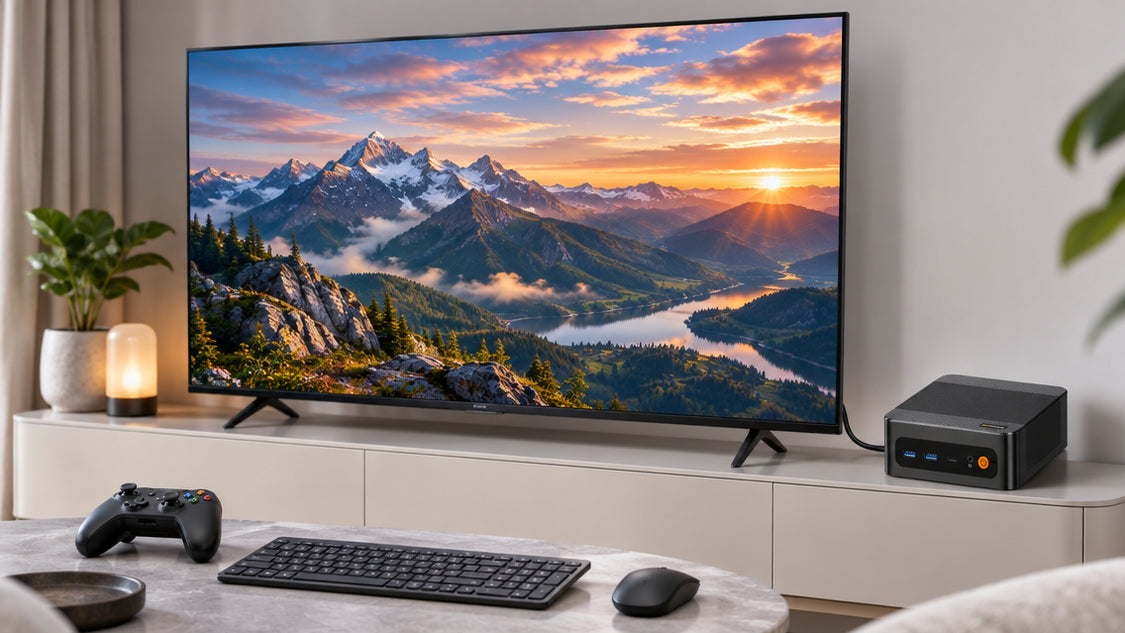
By connecting a compact computer to a television with an HDMI lead, you can turn the TV into a large-screen device for far more than watching programmes. A mini PC for TV lets users stream films, surf the internet, play local video files, and carry out ordinary computing tasks in the living room. Because such a system is small, offers varied connectivity, and works like a desktop, it is a sensible option for home entertainment and daily use.
A Mini PC for TV Compared with a Conventional TV Box
A conventional TV box is built mainly around video streaming, providing access to media applications and basic entertainment functions. A mini PC for TV, by contrast, combines a complete desktop environment with the television, giving users considerably more freedom. The following advantages help explain why it can be the better pick.
Stronger hardware for diverse tasks
Compact computers usually surpass basic TV boxes in processor, memory, and graphics capability. As a result, they can do more than play video: they can browse the web, run several applications at once, handle office software, and even support some PC games. Users can therefore enjoy entertainment while also gaining access to a broader range of desktop programs.
More adaptable storage
Many TV boxes have limited built-in capacity, which restricts how many apps and media files can be kept on the device. A mini PC for TV provides greater storage choice, with various SSD sizes available across different models. External USB drives can also be attached for films, videos, and other large files. This makes it simpler to create and maintain a personal media collection without depending solely on cloud services or streaming platforms.
Better prospects for upgrades and expansion
Whereas many TV boxes come with hardware that cannot be changed, some compact computers let users increase RAM and storage when requirements change. Selected models also include OCuLink or similar expansion interfaces, so an external GPU can be added for extra graphics power. In addition, several USB ports and other connection options make it easy to attach external drives, keyboards, mice, and other accessories. Such flexibility helps the device remain useful beyond ordinary home entertainment.
How to Pick the Right Mini PC for TV
The best choice depends on the display you use, the performance you require, and the connections you need. Consider the following five points before purchasing.
Display output and resolution
Inspect the video output ports, particularly HDMI. Confirm that the computer supports the resolution and refresh rate of your television. For a 4K TV, choose a model capable of 4K output at 60Hz or above, according to your viewing habits. If the device cannot match the TV’s native resolution, the picture may look softer and less detailed.
Processor choice
The processor determines how smoothly the system copes with different workloads. An entry-level chip can be enough for video streaming, web browsing, and simple entertainment. If you often multitask, watch high-resolution live streams, or play PC games on the TV, a more capable processor is advisable.
RAM capacity
Memory affects how well a mini PC for TV handles several tasks simultaneously. For basic use, such as streaming and browsing, 16GB may suffice. If you switch frequently between apps, keep many browser tabs open, or combine TV entertainment with everyday computing, 32GB is more practical. For demanding multitasking or heavier applications, consider 64GB or more. Also check whether the RAM can be upgraded if you want future flexibility.
Storage space
Storage determines how many applications, films, and videos can be stored locally. A 256GB SSD is adequate for basic streaming and routine use, while 512GB gives more room for apps and media files. If you intend to build a large film collection or keep high-resolution videos, look for a 1TB SSD or a model with extra M.2 slots for later expansion.
Network connectivity
Choose a model with dependable wireless connectivity, ideally dual-band Wi-Fi or a newer standard such as Wi-Fi 6. A strong signal reduces buffering when streaming films, watching live broadcasts, or accessing online content. For greater stability, especially with 4K video, consider a mini PC for TV that has an Ethernet port for a direct router connection.
Steps of Connecting a Mini PC to a TV
Connecting a mini PC to your TV is very simple and usually takes only a few minutes. Follow the steps below to set up your home entertainment system.
Step 1: Use an HDMI cable
Connect the computer to the TV with an HDMI cable. Insert one end into the computer and the other into a free HDMI port on the television. Switch on both devices, then choose the matching HDMI input with the TV remote.
Step 2: Adjust audio and display settings
After connection, open the Windows display settings and choose a suitable resolution and refresh rate. Then go to the sound settings and confirm that the TV is selected as the audio output, so sound comes from the TV speakers rather than the computer.
Step 3: Add a keyboard, mouse, and network connection
Attach a wireless or wired keyboard and mouse so you can control the system from the sofa. Then join your home Wi-Fi network, or use an Ethernet cable for a more stable connection. Your mini PC for TV is now ready for streaming, browsing, and other entertainment.
Conclusion
A mini PC for TV can expand what a home entertainment setup can do, making the television more than a screen for watching content. Whether the goal is streaming, gaming, web browsing, or managing local media, a suitable model can adapt to different needs. With the right choice, the living room becomes a more flexible place for both entertainment and everyday computing.

Leave a comment
All comments are moderated before being published.
This site is protected by hCaptcha and the hCaptcha Privacy Policy and Terms of Service apply.