
What Is a Mini PC?
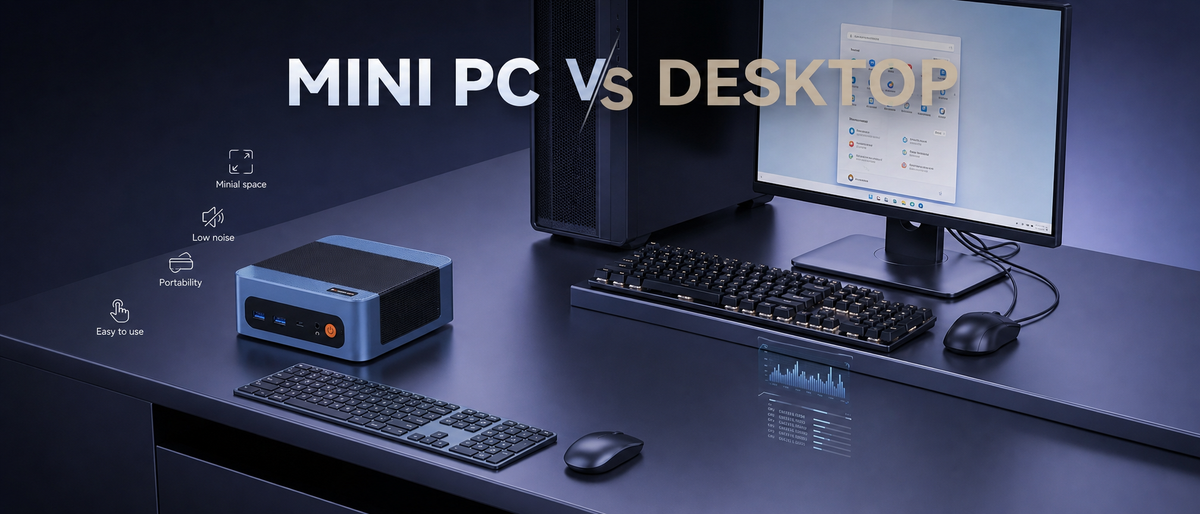
A mini PC is a small, complete computer that handles the same everyday tasks as a standard desktop—web browsing, office work, streaming media, and more—while taking up only a fraction of the space. Rather than housing separate parts inside a full tower, a mini PC packs everything into one compact unit, often no larger than a hardcover book. Even with this smaller footprint, today's mini PCs come equipped with capable processors and graphics, making them a practical, space-conscious choice for daily computing, home offices, and entertainment centers.
What Is a Desktop?
A desktop is a personal computer built to remain in a fixed spot, usually on or beneath a desk. It's centered around a full-size tower that contains all of its internal parts—CPU, graphics card, storage drives, and cooling system—linked to a separate monitor, keyboard, and mouse. This traditional design, with its multiple components and larger case, often results in a setup that takes up considerable room on or around the desk.

Mini PC vs Desktop: Which One Is Better?
Deciding between a mini PC and a conventional desktop isn't always simple, since both can manage everyday computing without trouble. So how do you know which fits your needs? Below, we break down the mini PC vs desktop debate across several key factors to help guide your decision.
Mini PC vs Desktop: Space-Saving Capacity
When it comes to space, the difference between a mini PC and a desktop becomes clear right away. A mini PC can be tucked behind a monitor, wedged into a small corner of a desk, or even mounted completely out of sight—no bulky tower, no snarl of cables covering the floor. A desktop, on the other hand, requires dedicated floor or desk area along with room for proper airflow. Whether you're working in a home office, a dorm room, a shared workspace, or any compact setting, a mini PC fits into places a desktop simply can't.
Mini PC vs Desktop: Energy-Saving Capacity
Power consumption is another area where mini PCs stand out. Compared with a standard desktop, a mini PC is notably efficient and draws far less electricity. Desktops, with their bigger internal components and heavier-duty cooling, typically use more power even while sitting idle. If your computer runs for long stretches—whether for home-office use, as a media hub, or for background processes—a mini PC can mean noticeably lower electricity costs over time.
Mini PC vs Desktop: Noise Reduction
Sound output is another point in the mini PC vs desktop comparison. Traditional desktops often depend on several fans and larger cooling assemblies, which can generate noticeable noise under heavy workloads. Mini PCs, by contrast, rely on compact, well-engineered cooling systems that keep fan noise down while still delivering steady performance. In a home office, bedroom, or shared work area, a quieter mini PC helps create a more pleasant environment without giving up everyday productivity.
Mini PC vs Desktop: Portability
The contrast in portability between the two is especially striking. A mini PC is small and light enough to slip into a bag, so moving it between home and office—or bringing it along on a trip—is easy. A desktop, once assembled and set up, is essentially fixed in place; disconnecting and moving a full tower isn't something most people do regularly. For hybrid workers, students, or anyone who needs to work from different locations, a mini PC provides a level of flexibility that a desktop can't offer.
Mini PC vs Desktop: Setup Simplicity
Getting a mini PC up and running is refreshingly easy. Most models arrive nearly ready to go right out of the box, with little cabling involved and no need to deal with tangled internal wiring or multiple fan connectors. Desktops tend to involve a more involved setup process, particularly when you're adding parts or routing cables inside a larger case. For anyone who wants a smooth experience without technical headaches, a mini PC can be ready to use within minutes.
Conclusion
Choosing between a mini PC and a traditional desktop ultimately depends on your specific needs. For users who prioritize a compact footprint, low power consumption, quiet operation, portability, and ease of setup, a mini PC is a highly attractive option. Modern mini PCs deliver increasingly powerful performance despite their small size, making them an ideal solution capable of handling a wide range of tasks, including home office work, entertainment, study, and everyday computing.

Leave a comment
All comments are moderated before being published.
This site is protected by hCaptcha and the hCaptcha Privacy Policy and Terms of Service apply.